Camera
The Camera Component enables an entity to render a scene from a certain viewpoint.
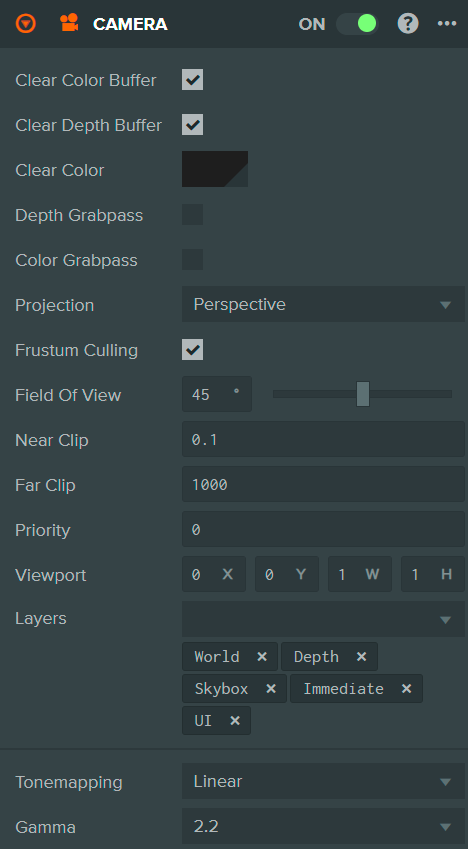
Properties
| Property | Description |
|---|---|
| Clear Color Buffer | If enabled, the camera will explicitly clear its render target to the chosen clear color before rendering the scene. |
| Clear Depth Buffer | If enabled, the camera will explicitly clear the depth buffer of its render target before rendering the scene. |
| Clear Color | The color used to clear the camera's render target. This property is only displayed if 'Clear Color Buffer' is enabled. |
| Depth Grabpass | If enabled, the camera will render the scene's depth to a depth map texture which can be accessed in shaders. Useful for effects like soft particles or depth-based post-processing. |
| Color Grabpass | If enabled, the camera will render the scene's color to a color map texture which can be accessed in shaders. Useful for effects like refraction or screen-space distortion. |
| Projection | The projection type of the camera. Options are:
|
| Frustum Culling | If enabled, the camera will only render mesh instances whose axis-aligned bounding boxes intersect with the camera's view frustum. Otherwise, the entire scene will be rendered regardless of visibility. |
| Field of View | The angle between top and bottom clip planes of a perspective camera. This property is only displayed if 'Projection' is set to 'Perspective'. |
| Ortho Height | Half the height of an orthographic camera's view volume in world units, so the view spans twice this value vertically. The width is derived from the aspect ratio. This property is only displayed if 'Projection' is set to 'Orthographic'. |
| Near Clip | The distance in camera space from the camera's eye point to the near clip plane. |
| Far Clip | The distance in camera space from the camera's eye point to the far clip plane. |
| Priority | A number that defines the order in which camera views are rendered by the engine. Smaller numbers are rendered first. |
| Viewport | A rectangle that specifies the viewport onto the camera's attached render target. This allows you to implement features like split-screen or picture-in-picture. It is defined by normalized coordinates (0 to 1) in the following format: X (lower left x), Y (lower left y), W (width), H (height). |
| Layers | The layers that this camera will render. Only mesh instances on matching layers will be rendered by this camera. |
| Tonemapping | The tonemapping algorithm to apply when rendering HDR content. Options are: Linear, Filmic, Hejl, ACES, ACES2, Neutral. This property is only available with Engine v2. |
| Gamma | The gamma correction value to apply. Options are 1.0 (no correction) or 2.2 (standard gamma). This property is only available with Engine v2. |
See Also
- Cameras - Learn more about cameras
Scripting Interface
You can control a Camera Component's properties using a Script Component. The Camera Component's scripting interface is here.